
How to check a site's backlinks and find competitor link gaps in Serpair
Read a backlink profile, inspect source pages and compare competitor link gaps in Serpair. Learn the report limits and how to treat spam flags.
Open Backlinks for the website selected in Serpair. Start with the summary numbers, then open each source listed in the table. You can compare an available competitor further down the same page. Backlink analysis is available in the 30-day free trial, with no credit card required, and in paid plans. Checks use credits; existing cached results are free to read. Start the 30-day trial to use backlink analysis in the app.
When another website links to yours, that is a backlink. The website sending it is a referring domain. One referring domain can send links from several of its pages and still count as a single referring domain.
Read the profile summary
Look at the backlink total next to the referring-domain total. Then look at the broken-link count and the follow/nofollow counts. Nofollow is a code label on a link. It asks search engines to skip associating the linking site with the destination. The follow count covers links that do not carry that label.
The Domain rank figure comes from DataForSEO and runs from 0 to 1000. Google does not supply it. Ahrefs’ Domain Rating uses a different 0-to-100 scale; it is not interchangeable with domain rank. If a directory is pitched as a way to raise a score like Domain Rating, read whether startup directory backlinks are worth your time before you submit.
Read the link table
Every row pairs a source page with the page it points to. The anchor column shows the clickable wording. Nearby columns cover authority, follow status and spam score. Open the sentence that holds the link and see where the click lands.
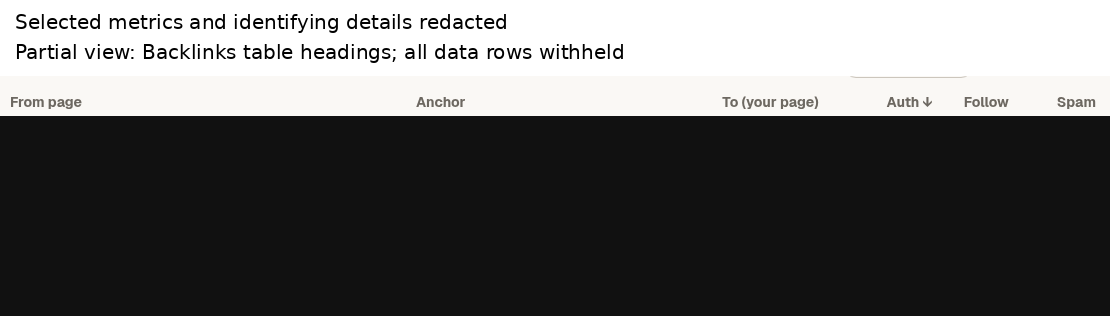
Selected metrics and identifying details redacted. Partial view of the single Backlinks page, showing table headings only. The list contains one representative link per referring domain; all data rows are withheld.
For each referring domain, the app shows one representative link. The rest of that website’s links stay off the list, so the row count can sit below the backlink total.
Per analyzed domain, Serpair can pull in as many as 300 referring domains and 300 backlinks. Those numbers cap what the report retrieves. A website can still have more links beyond them. Once you are signed in, the app may reuse cached results for as long as 180 days. Do not describe this report as live or daily monitoring.
Check the anchor breakdown
The anchor summary groups clickable wording into branded, exact, naked, generic and spammy buckets. Branded wording uses the brand name; an exact anchor matches a target phrase. A naked anchor displays a web address, while generic wording says something like “visit website.”
Click through the pages in a bucket before you treat the grouping as a problem. Seeing the same wording over and over can be worth a closer look. On its own it does not prove manipulation.
Look at the destination page too. When a link points at a missing or unrelated page, sort that out before you go after more links. Our technical SEO for AI search guide walks through the work that helps search systems reach and read your pages.
Review spam flags carefully
A spam score above 30 or an anchor classified as spammy triggers the app’s flag. Read the source page before you act on the flag. This screening rule is neither a definitive toxic-link audit nor a judgment from Google.
“Risky links” are links that deserve review for possible spam or ranking manipulation. Google’s link-spam policy spells out which practices are prohibited. Its link-attribute guidance covers the labels used for paid placements and for links that users add.
On the page you will find an Export disavow file control. A disavow asks Google to ignore the incoming links you specify. An export is not a recommendation to submit the file.
Google’s disavow guidance says most sites do not need the tool. Google recommends the tool only when a large set of spammy or artificial links has caused a manual action, or looks likely to. A manual action is a penalty after a human review. Try removing qualifying problematic links first. Incorrect use can harm search performance.
Put a competitor next to your profile
Pick an available competitor that sells to the same kind of buyer. In the referring-domain link-gap table, a gap is a site that the compared data shows linking to that competitor while it does not link to you.
Before keeping a prospect, read why the page references the competitor. Would your documentation or product belong in that discussion? The app comparison returns up to 100 gap prospects and 50 common sources. Coverage limits and cached data mean an apparent gap still needs checking.
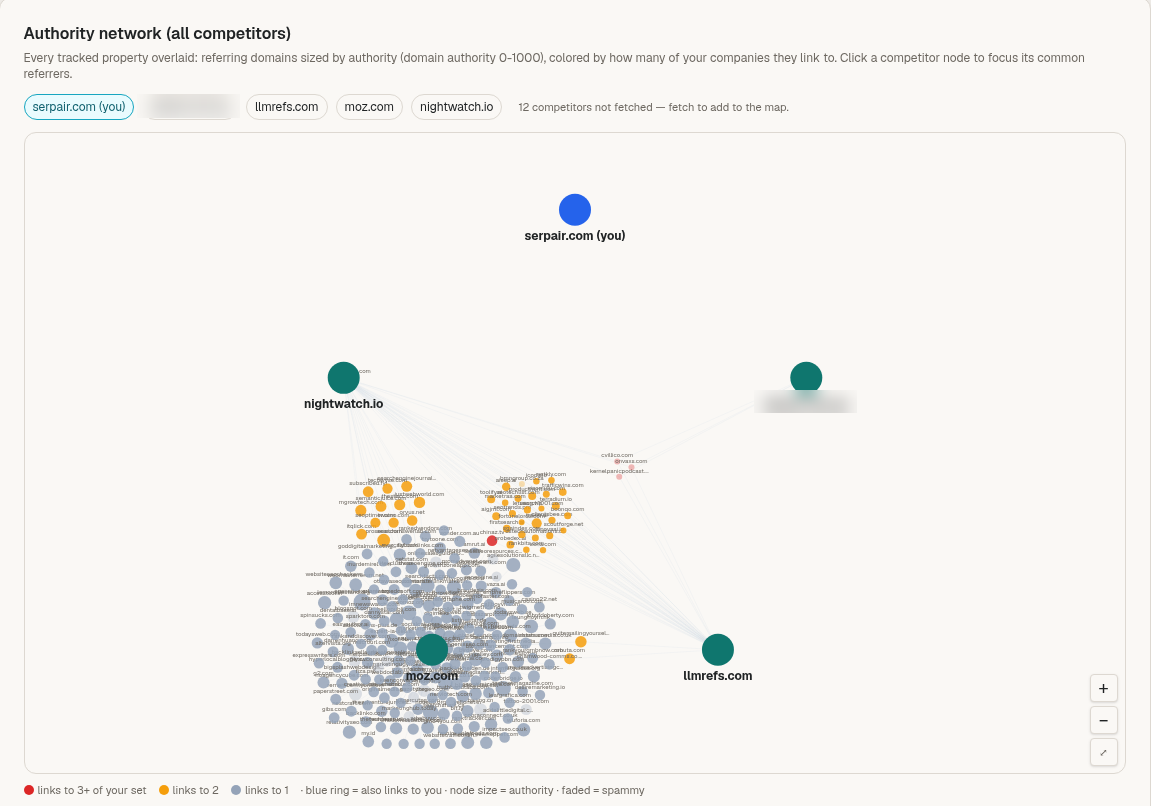
The backlink network overlays every site you track. Orange and red dots are sites linking to two or more of your competitors, so they are the properties you should be on too.
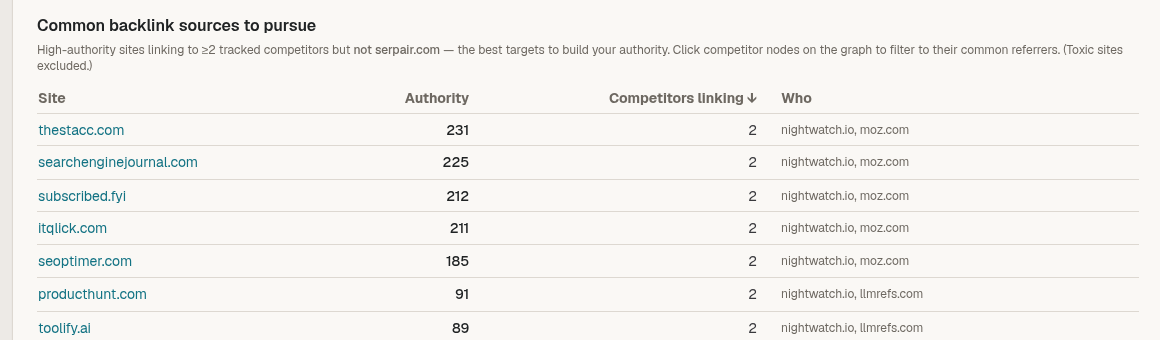
An excerpt from the common backlink sources list: sites linking to at least two competitors but not to you, sorted by domain rank on a 0 to 1,000 scale.
Hold the AI-written strategy up against the pages you actually open. A suggestion alone leaves relevance unproven, and it gives you no permission to contact a publisher.
Note what you change as you go
Save the date of your review and the links you investigated. There is no new/lost backlink monitoring or backlink trend history in this report. Check source pages manually before describing a link as newly added or removed.
You can follow Google rankings and AI mentions separately in Serpair. Serpair tracks mentions in ChatGPT, Perplexity, Google AI Overviews and Gemini. Keep website traffic and signups in your traffic reports too. An improvement after backlink work does not prove a particular link caused it.
Try the public backlink check
The public backlink checker takes your domain and one competitor without sign-up. Type the competitor or choose from up to five suggested competitors from collected data. Complete a quick human check.
Your summary shows only total backlinks, referring domains and DataForSEO domain rank from 0 to 1000. The gap shows up to 10 referring domains linking to the competitor but not you in the DataForSEO index. For every row you get domain rank, a spam score from 0 to 100, and how many links go to the competitor. Any further matches show up as a locked count. You do not get extra rows there, and none of those matches are guaranteed placements.
The public tool allows as many as three requests inside 24 hours. Loading competitor suggestions uses the same allowance as running a check. That rolling allowance is counted per IP address. It is separate from your account and from the calendar day. Public requests leave your account credits untouched. Access can still be limited when the service is under load.
The own-domain summary can be up to 180 days old; gap data and suggestions can be up to 30 days old. Signing up for the 30-day free trial, no credit card required unlocks the full list of gap sites.
Questions about checking backlinks
Can I check my backlinks in the trial?
Yes. Backlink analysis is included in the 30-day trial and all paid plans. Normal credits still apply to checks that require data retrieval.
Is the free visibility analysis the backlink checker?
No. The free SEO and AI visibility analysis covers search visibility, competitors and suggested fixes. Backlink data sits outside that report. The public backlink checker is a separate report.
Is the table a complete backlink export?
No. It shows one representative link per referring domain within the retrieval limits. The disavow-file control is built for a separate job.
How recent are these results?
On the public tool, your own-domain summary can be as old as 180 days. Gap data and suggestions can be as old as 30 days. Results in the signed-in app can stay cached for up to 180 days as well. Reading cached app results is free; public requests still count toward their rolling allowance.
Will closing a link gap improve my Google ranking or AI mentions?
A matched source is only a place to investigate. The source might link to you later and your visibility might rise. That sequence still leaves the cause unproven.
See your own AI & search visibility
Serpair tracks your Google rankings and measures whether ChatGPT, Perplexity, and Gemini cite your brand — then hands you a plain-English action plan.
Start 30-day free trial